
Ask
Ask Chip a question & it answers from everything it knows about your support: the cases your team has handled & the insights Chip has drawn from them, the documentation sources you have connected, the documents you have given it & the records your automations produce, with every source linked so you can check the answer yourself.
Where you can ask
- The web app. Open Ask in the left navigation.
- The browser extension, for Chrome & Firefox.
- The Slack agent. Mention the Waypoint app or send it a direct message.
- The plugins for Salesforce, Jira, Zendesk & ServiceNow.
In the web app the screen introduces itself as Ask Chip & offers a box that reads Ask about past cases, analyze trends, or search for specific issues.... A couple of suggested questions sit under the box & a few tips beside it. Ask the way you would ask a colleague who has read every case.
Ask or Build
Ask & Build are the same Chip on two different jobs. Ask is for a question that has an answer: has this happened before, what are we seeing most this month, how has criticality moved since the release. Chip reads, reasons & reports; nothing in your data changes. Build is for when you want something to exist afterwards: a table, the screen your team opens, an automation that runs on its own. A sentence that starts with "what do we know about" belongs in Ask. One that starts with "make me" or "every Monday" belongs in Build.
While you are building, ask Chip about the data in the space & it answers right there; the guide shows one.
Tips for better results
| Tips for better results | Why it matters |
|---|---|
| Give Chip the exact words. The error text, the symptom, the customer's own phrasing. | Exact words give exact matches & an exact count; a description finds related cases by meaning |
| Name the case when you have it. A case number or a ticket key. | Chip goes straight to it & reads the whole thread, the engineering ticket linked to it included |
| Say the window. "Last week", "this quarter", "since the release". | Chip counts from today & keeps the research inside the window you mean |
| Set the filters above the box when the question is about a slice: a date range, a status, any label your policies or connected systems apply. | The whole run stays inside that slice |
| Attach what you are looking at. A screenshot, a log excerpt, a config file, a PDF. | Chip reads it as part of the question, error lines in a log included |
| Say the shape you want. "As a table", "a chart by month", "keep it short". | The answer is written to that shape |
What happens when you press send
Chip researches the way a careful colleague would. It writes a plan first: a short sequence of questions it will answer in turn, each building on the one before, with the direct question up front & the documentation lookup after it, so the fix is looked up for the cases actually found. Then it runs the plan, reads the matching cases in full & says what it is doing as it goes.
Open the Research Steps tab to read the plan & watch each step complete. Asked the wrong thing? Cancel Research stops it & the box asks what you would like to ask instead.
Chip plans only against what your workspace has: a documentation lookup when documentation is loaded, a code investigation when a code repository is connected.
What an answer contains
One answer, written to be read on its own. A summary comes first, then the findings grouped by theme, then the evidence behind each, linked to the cases, tickets & documents it came from, then recommendations where the findings support them. Numbers arrive as tiles, tables & charts. Every link is one Chip found in your data; where it has none it says so. Chip answers in your language or the one you asked in.
Under the answer sit its sources: a Resources panel lists every case, ticket & document Chip touched, each marked as used.
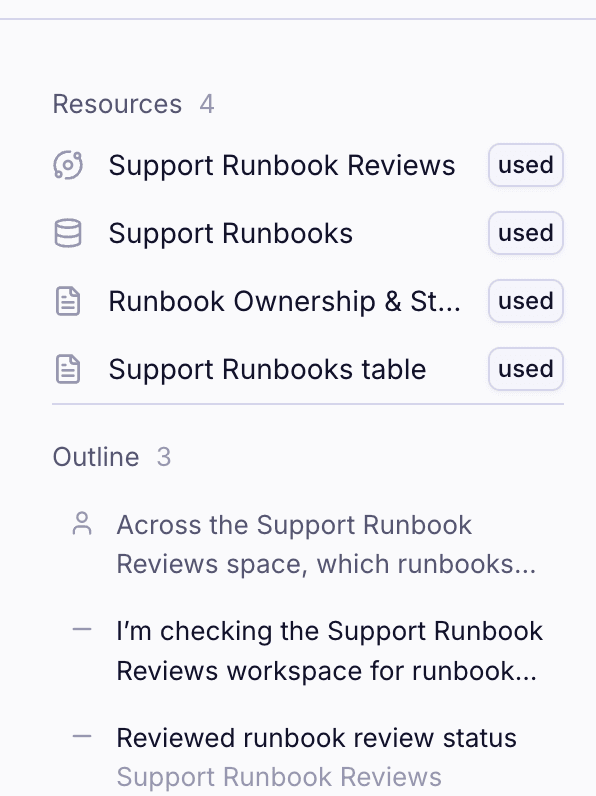
Every case, ticket & document carries its status & link. Copy the answer with one click & rate it.
Go deeper
Every answer ends with suggested follow-ups written from what Chip found: who handled the earlier cases, what the root cause was in the closest match, how the largest group breaks down by month. Click one or type your own. Chip keeps the research in view: a clarification is answered from what it already found; a new question sends it back to your cases & documents.
Tell Chip something worth remembering (your role, the accounts you cover, how you like your answers) & it carries that into later conversations. Ask what it remembers & it tells you; tell it to forget & it does.
Share offers Private (Only you can view this thread), Unlisted (People in this workspace can view this thread with the link) & Workspace (Everyone in this workspace can view and find this thread), with Copy link underneath. The sidebar keeps every thread, with All, Mine & Shared views & a search box.
Ask from Slack & the answer comes back in the thread with a View in Waypoint button.
Ask on a schedule: Scheduled research runs a saved question daily, weekly or monthly in your timezone & files each run as a thread.
How Ask & Build work together
- What Build writes, Ask can find. Chip writes an intent, an overview & a plan for every space it builds, so "why was this built" & "where did we get to" are questions you can ask.
- What automations produce, Ask can query. The fields extracted from a contract, the analysis run on an attachment, the outputs an automation files: records Chip can list, read & summarise.
- What you give Chip once serves both. A document you upload is read by Build to extract from & searched by Ask to cite.
- An answer becomes an automation in one sentence. Found the breakdown you want every Monday or the condition that should alert someone? Paste it into Build.
The limit is your imagination
Ask is at its best with the questions that used to cost an afternoon of exporting. "What do this month's upload failures have in common?" "How has sentiment moved for our largest accounts since the release?" "Which of last quarter's escalations were the same bug under different names?"
See it asked
- Find out if it has happened before: a symptom in, the history & the fix out.
- Catch up on any case in one question: a case number in, the whole case out.
- Spot the patterns across your cases: what is driving escalations this month.